

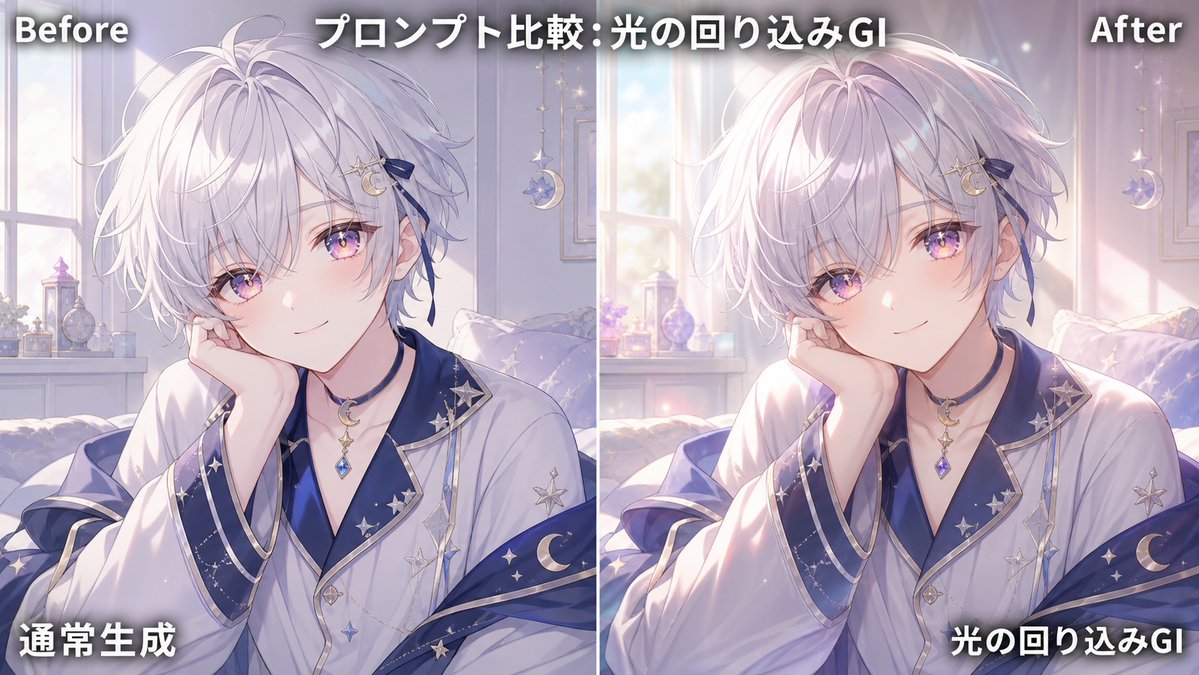
Goal: Create a side-by-side comparison graphic demonstrating global illumination / indirect bounce lighting improvement on the same anime illustration.

Canvas: Wide 16:9 horizontal image, split exactly into two equal vertical panels with a thin white divider line down the center. Use a soft pastel anime illustration style with dreamy morning light.

Layout: The left panel is labeled “Before” at the top-left and shows the normal version; the right panel is labeled “After” at the top-right and shows the enhanced version with warmer indirect light, natural contact shadows, and soft glow wrapping around the subject. Add a large centered headline across the top reading [headline text]. Add bottom-left Japanese label [left bottom label] on the left panel and bottom-right Japanese label [right bottom label] on the right panel. All overlay text is bold white with a dark drop shadow for readability.

Subject details: Show the same androgynous anime boy in both panels, seated indoors in a cozy bedroom by a bright window. He has fluffy layered [hair color] hair with lavender shadows, pale skin, and a slim elegant build. His face is intentionally covered by one large opaque pale mauve square censor block centered over the face in each panel; use exactly 2 censor blocks total, one per panel. His right hand rests near his cheek, partially visible beside the censor block. He wears a luxurious white robe or kimono-like top with navy-blue inner layers and wide sleeves, trimmed with metallic silver edges, decorated with star and crescent moon motifs. Include a crescent moon pendant necklace with a dangling blue gemstone.

Background details: The room contains exactly 1 large window visible behind the subject, soft curtains, a bed or cushioned seat, a small shelf or windowsill with perfume bottles and ornaments, and exactly 1 hanging crescent-moon decoration on each panel. The palette is lavender, white, pale blue, and warm sunlight.

Lighting comparison: Left “Before” panel should look flatter and cooler, with less bounce light and weaker shadows. Right “After” panel should visibly improve depth: add soft global illumination, warm sunlight wrapping around hair, face area, hands, robe folds, and shoulders; add subtle contact shadows where the hand touches the face area and where sleeves overlap; add bloom near the window and brighter rim light on the hair. Keep the character pose and composition identical between panels.

Constraints: Countable elements must remain exact: 2 comparison panels, 1 vertical divider, 4 text labels total, 2 face censor blocks, and 2 hanging crescent decorations. No watermark, no extra logos, no additional panels.



0 Comments
👥 Co-learning Circle 0
Observe other members' variables & configurations, and click "Study & Retry" to instantly import settings and practice!