

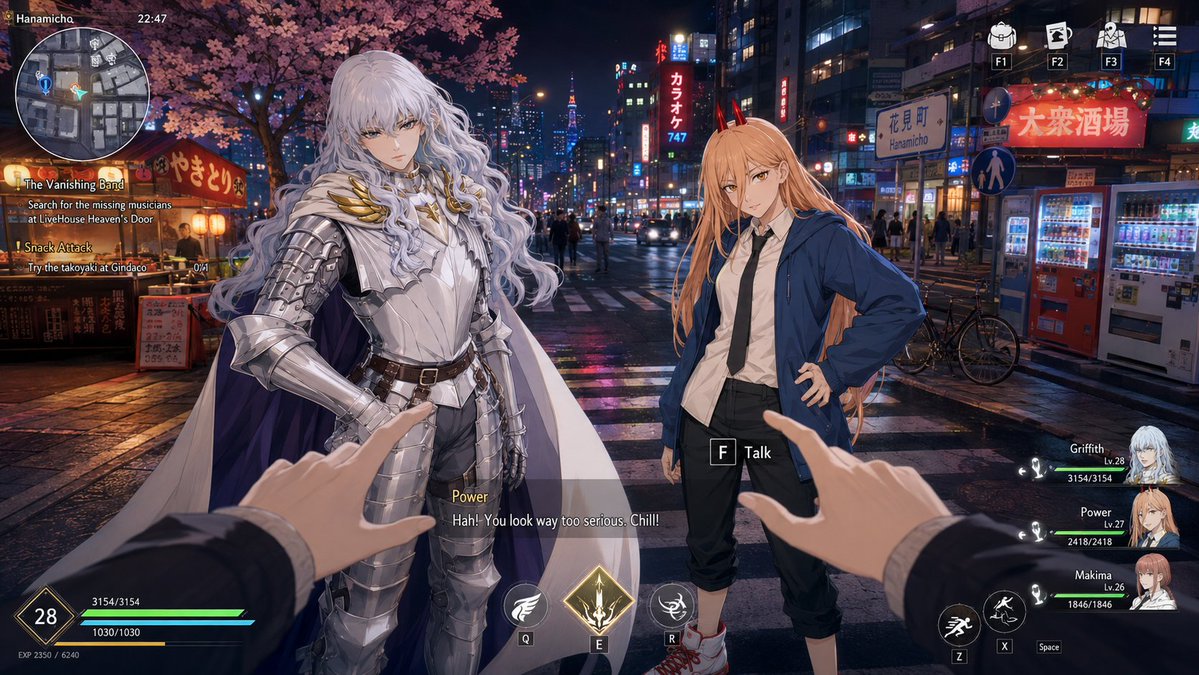
Goal: Create a cinematic open-world RPG screenshot set in a rainy neon Tokyo nightlife district, styled like a high-budget anime game UI crossover. The scene shows the player facing two anime companions in the middle of a wet crosswalk under cherry blossoms, with immersive HUD elements overlaid.

Canvas: 16:9 horizontal game screenshot, 1170×675 or similar wide aspect ratio, nighttime, sharp foreground characters and detailed city background, glossy rain reflections on pavement.

Environment: A dense Japanese city street in Hanamicho at night, inspired by Kabukicho. Include glowing storefront signs, vending machines on the right, bicycles near the curb, pedestrians in the distance, zebra crossing lines, wet asphalt reflecting pink, blue, yellow, and red neon. A large cherry blossom tree with pink flowers spreads across the upper left. Add food-stall lanterns and warm signage on the left, plus tall buildings and a distant illuminated tower in the center background.

Main characters: Place exactly 2 full-body anime NPCs in front of the player. Left character is [left character name], a tall elegant silver-haired fantasy knight with very long wavy pale hair, ornate shining silver plate armor, gold wing-like collar details, white cape with dark purple lining, black undersuit, belt, and poised serious stance. Right character is [right character name], an anime girl with very long peach-orange hair, small red horns, white shirt, black tie, oversized blue hoodie, cropped black pants, and red sneakers, standing casually with one hand on her hip. Faces should appear softly blurred or featureless as if anonymized, while preserving hair and outfit details.

Player perspective: First-person view with exactly 2 visible hands reaching forward from the bottom foreground, wearing dark suit sleeves. The left hand points toward the knight and the right hand points toward the horned girl, creating an interactive dialogue moment.

HUD and UI elements: Add exactly 7 main interface groups. 1) Top-left location text: “Hanamicho” and the time “22:47”. 2) A circular grayscale minimap below it with small colored route markers. 3) A left quest tracker with exactly 2 quests: “The Vanishing Band” with objective “Search for the missing musicians at LiveHouse Heaven’s Door”, and “Snack Attack” with objective “Try the takoyaki at Gindaco” plus progress “0/1”. 4) Top-right shortcut icons labeled exactly F1, F2, F3, F4, using small white icons for inventory, map/card, social/character, and menu. 5) Center interaction prompt near the right character: a boxed key “F” followed by “Talk”. 6) Bottom dialogue subtitle box showing speaker name [speaker name] in yellow and dialogue [dialogue line]. 7) Bottom combat HUD with player level 28, HP “3154/3154”, secondary bar “1030/1030”, EXP “2350 / 6240”, three ability buttons labeled Q, E, R, and three movement/action icons labeled Z, X, Space.

Party list: On the right side, include exactly 3 party member cards with portrait thumbnails, names, levels, and HP values: “Griffith Lv.28 3154/3154”, “Power Lv.27 2418/2418”, and “Makima Lv.26 1846/1846”.

Visual style: Seamlessly combine realistic rainy urban photography background with crisp anime character art and polished fantasy RPG HUD. Use dramatic neon lighting, cinematic depth, high detail, clean readable UI typography, no watermark, no extra characters in the foreground, no additional quests or party members.



0 Comments
👥 Co-learning Circle 0
Observe other members' variables & configurations, and click "Study & Retry" to instantly import settings and practice!