

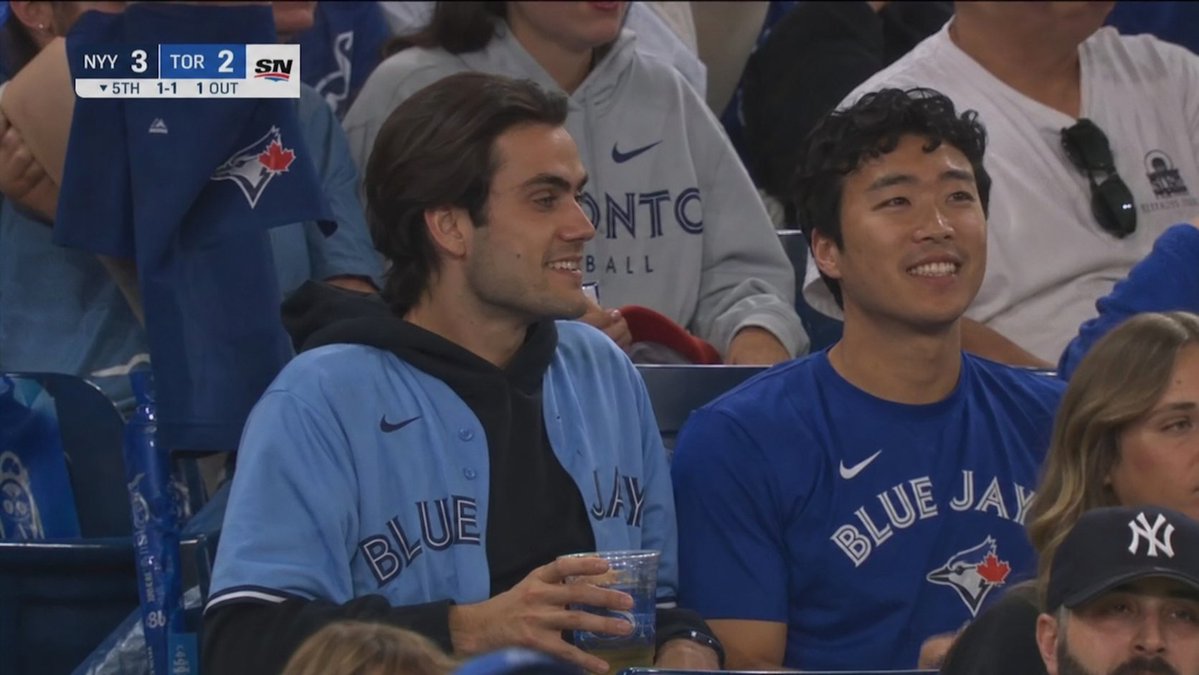
Create a realistic broadcast TV screenshot from a Major League Baseball crowd shot at a [team name] home game, framed in a 16:9 HD sports-telecast crop with shallow stadium lighting and slight compression blur. The scene shows two young adult male fans seated side by side in the lower bowl, both faces anonymized by flat medium-brown rectangular blocks. The left fan has medium-length dark hair and wears a light powder-blue Blue Jays button-up jersey over a black hoodie, holding a clear plastic cup of beer with both hands near his lap. The right fan has short curly dark hair and wears a royal-blue Blue Jays Nike T-shirt, sitting upright and looking toward the field. Around them are other spectators in blue, white, and gray clothing, including a person behind them in a gray Toronto hoodie, a fan at left wearing a blue Blue Jays jersey with the bird-and-maple-leaf logo, and partial foreground heads at the bottom and right; include exactly 3 visible anonymized face blocks total, two large blocks over the central fans and one partial block on the right edge. Add an authentic TV scoreboard bug in the upper-left corner with a dark blue and white Sportsnet style: [away team abbreviation] score [away score], [home team abbreviation] score [home score], the Sportsnet SN logo on the right, and a lower line reading "▼ 5TH 1-1 1 OUT". Make it look like a paused live broadcast crowd reaction shot, not a posed photo, with realistic stadium seats, team logos, natural shadows, and telephoto lens perspective.



0 Comments
👥 Co-learning Circle 0
Observe other members' variables & configurations, and click "Study & Retry" to instantly import settings and practice!