

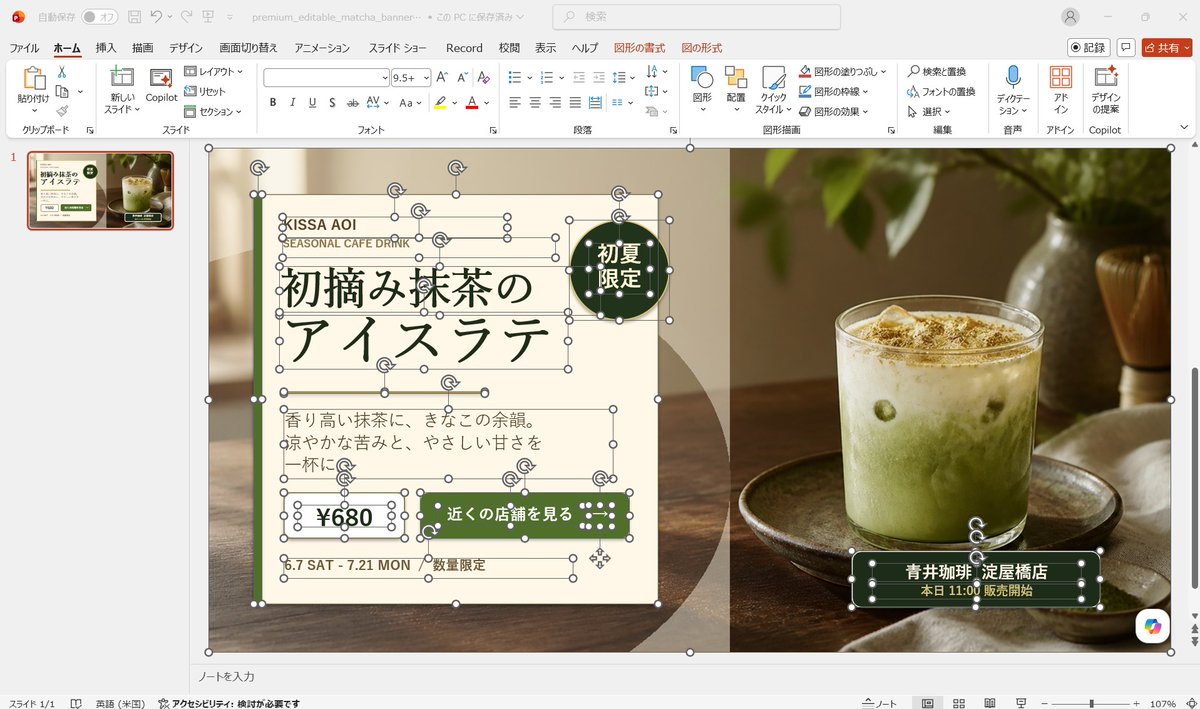
Goal: Create a realistic desktop screenshot of Microsoft PowerPoint in Japanese, showing an editable banner advertisement design for a matcha drink. The scene should look like the banner is being built from separate selectable PowerPoint objects, with many resize handles, rotation icons, and bounding boxes visible.

Canvas: 16:9 widescreen screenshot, approximately 1200×675 px, with the full PowerPoint application window visible. Use a light gray Windows/Office interface, Japanese ribbon labels, one slide thumbnail on the left, the main slide centered, status bar at the bottom, and a zoom level around 107%.

PowerPoint interface: Show the Home tab active with Japanese menu items across the top such as File, Home, Insert, Draw, Design, Transitions, Animations, Slide Show, Record, Review, View, Help, plus contextual Shape Format and Picture Format tabs. Include a search box near the top, a red Share button at top right, and a single slide thumbnail in the left navigation pane. The filename area should suggest a saved presentation named similar to “premium_editable_matcha_banner”.

Main slide layout: The slide itself is a premium café banner split into two visual halves. The left half is a cream paper-like advertisement panel over a warm blurred café/table background, and the right half is a close-up photo of an iced matcha latte in a clear glass on a wooden tray, with soft natural window light, green leaves above, a bamboo whisk in the background, and warm brown tones. Add a subtle vertical division between the cream text panel and the photo. Use a dark green, cream, beige, and warm wood color palette.

Visible editable objects: Show many individual PowerPoint selection boxes and handles on the banner, as if almost every text box, line, shape, icon, and photo is selected or editable. Include white circular resize handles, rotation arrows, thin gray bounding boxes, and overlapping object outlines. Count and show exactly 13 selected/editable object groups: 1 large slide background/image frame, 1 cream left panel, 1 small brand text group, 1 English subtitle text box, 1 large Japanese headline text group, 1 round dark-green badge, 1 description paragraph text box, 1 price box, 1 green call-to-action button, 1 date text box, 1 limited-quantity text box, 1 store information label on the photo, and 1 small dotted decorative icon group.

Text content on the banner: Preserve Japanese text accurately where visible. Brand area: “KISSA AOI” and “SEASONAL CAFE DRINK”. Main headline: “初摘み抹茶の” on the first line and “アイスラテ” on the second line. Round badge: “初夏限定”. Description paragraph: “香り高い抹茶に、きなこの余韻。涼やかな苦みと、やさしい甘さを一杯に。” Price: “¥680”. CTA button: “近くの店舗を見る”. Date: “6.7 SAT - 7.21 MON”. Small note: “数量限定”. Store label over the photo: “青井珈琲 淀屋橋店” and below it “本日 11:00 販売開始”.

Design details: Use elegant Japanese typography with a dark forest-green headline, thin decorative horizontal rules around the headline, cream rectangles with fine green borders, rounded dark-green buttons, and small dotted white decorations on green shapes. The badge should be a dark-green circle near the upper right of the cream panel. The store label should be a dark-green rounded rectangle near the bottom right of the drink photo. The overall ad should feel premium, calm, seasonal, and café-like.

Customization slots: Use the drink concept as [drink name], brand as [brand name], price as [price], CTA as [call to action], and store as [store name].

Constraints: Make it a screenshot of PowerPoint, not a clean exported poster. Keep the editing handles and object outlines highly visible. Do not add extra slides, extra products, watermarks, or unrelated UI panels. Keep the photo realistic and the ad elements editable-looking rather than flattened.



0 Comments
👥 Co-learning Circle 0
Observe other members' variables & configurations, and click "Study & Retry" to instantly import settings and practice!