

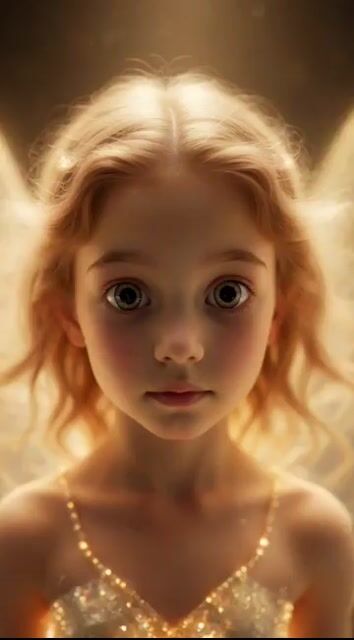
Faithfully reproduce the world view of (mentioned image). A magical 10-second animation of a girl holding a torch and a small glowing fairy inside a cave.

0-0.5 seconds: Start with an extreme close-up of the fairy's face. Large, curious, sparkling eyes stare intently at the camera, and golden light particles dance from its translucent wings.

0.5-3 seconds: The curious fairy quickly flies out of the frame and rapidly circles around the girl lying on the ground. It playfully repeats sharp turns and loops, scattering golden magic dust and sparkles.

2.8-4 seconds: The girl (holding a burning torch in her right hand) notices the fairy, opens her eyes wide in surprise, and slightly gasps.

4-6 seconds: The girl suddenly sits up on her knees, and the torch flame violently shakes, illuminating her surprised and moved face with orange light.

6-10 seconds: The girl slowly stands up, gazing at the fairy without looking away. The fairy hovers at chest height, playing by moving closer and farther away. The camera gradually pulls back, showing the sparkling green crystal floor and the cave walls widely. The warm torchlight and the cool emerald glow beautifully blend. Dreamlike atmosphere, ultra-detailed, cinematic movement, smooth 24fps animation.



0 Comments
👥 Co-learning Circle 0
Observe other members' variables & configurations, and click "Study & Retry" to instantly import settings and practice!