

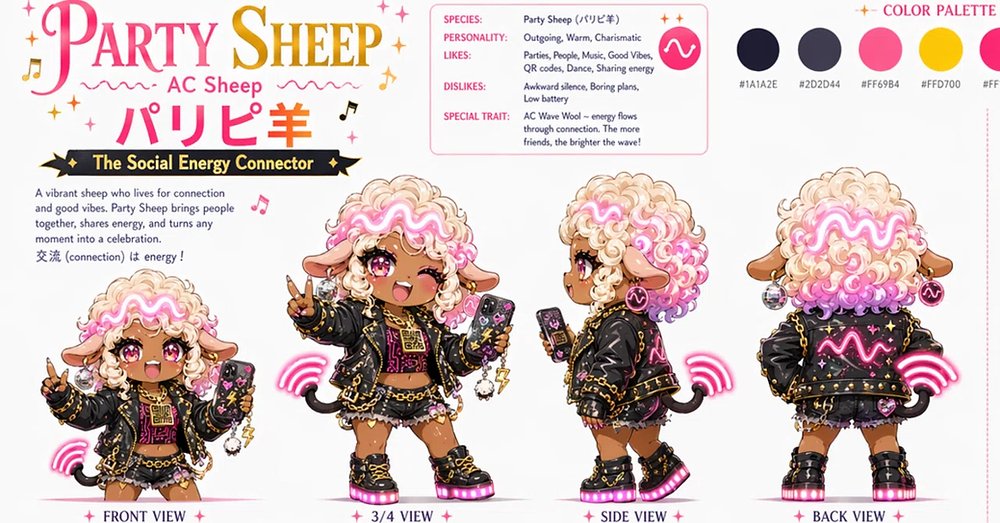
Goal: Create a polished kawaii character design sheet for [character name], an energetic AC sheep mascot themed around social connection, party vibes, and glowing waveform energy.

Canvas: Wide horizontal character reference sheet, clean white background, pink and gold accents, crisp print-ready layout. Use a cute Japanese idol-streetwear aesthetic with sparkles, music notes, tiny stars, and playful decorative dividers.

Header and typography: Large ornate title at top left reading “PARTY SHEEP” in a pink-to-gold gradient serif display font, with smaller subtitle “AC Sheep” beneath it. Include large Japanese name text “パリピ羊” in hot pink below the subtitle. Add a black ribbon banner with gold trim reading “The Social Energy Connector.”

Character details: The mascot is a chibi sheep girl with warm tan skin, big glossy pink eyes, one eye winking in some poses, sheep ears, small black tail, and very fluffy curly cream wool hair with bright pink curls. A neon pink glowing waveform runs through the front of the wool like an LED headband. Outfit: black cropped punk jacket with gold studs and chains, hot pink waveform graphics, black-and-pink patterned top, layered black mini skirt with ruffles, gold chain accessories, chunky black platform boots with glowing pink soles, hoop earrings, charms, wrist accessories, and a smartphone decorated with music and party icons. Overall expression is outgoing, cheerful, and charismatic.

Layout: Show exactly 4 full-body character views across the lower area, labeled beneath each pose: 1) “FRONT VIEW” at far left, smaller chibi front pose holding a phone and making a peace sign, 2) “3/4 VIEW” center-left, larger main pose smiling with one eye closed, holding up a peace sign and a phone, 3) “SIDE VIEW” center-right, profile pose looking left while holding the phone, 4) “BACK VIEW” far right, rear view showing the jacket back with glowing pink waveform and sparkling details. Add pink wireless energy-wave effects near the character in each view, especially by the tail/back area.

Information card: At the upper center-right, include a rounded rectangular pink outline profile card with exactly 5 labeled rows: “SPECIES: Party Sheep (パリピ羊)”, “PERSONALITY: Outgoing, Warm, Charismatic”, “LIKES: Parties, People, Music, Good Vibes, QR codes, Dance, Sharing energy”, “DISLIKES: Awkward silence, Boring plans, Low battery”, and “SPECIAL TRAIT: AC Wave Wool -- energy flows through connection. The more friends, the brighter the wave!” Include a hot pink circular icon with a white waveform inside the card.

Intro text block: Under the ribbon on the left, add a short paragraph: “A vibrant sheep who lives for connection and good vibes. Party Sheep brings people together, shares energy, and turns any moment into a celebration. 交流 (connection) is energy!”

Color palette: At the top right, add the title “COLOR PALETTE” in pink and display exactly 5 circular swatches in a row: near-black navy labeled “#1A1A2E”, charcoal purple labeled “#2D2D44”, hot pink labeled “#FF69B4”, golden yellow labeled “#FFD700”, and cream wool labeled [cream color hex]. Keep palette labels small and clean.

Style constraints: High-detail 2D anime/chibi concept art, clean linework, glossy highlights, soft shadows, sticker-sheet presentation, no photographic realism, no cluttered background, no extra character views, no extra labels beyond the specified text.



0 Comments
👥 Co-learning Circle 0
Observe other members' variables & configurations, and click "Study & Retry" to instantly import settings and practice!