{
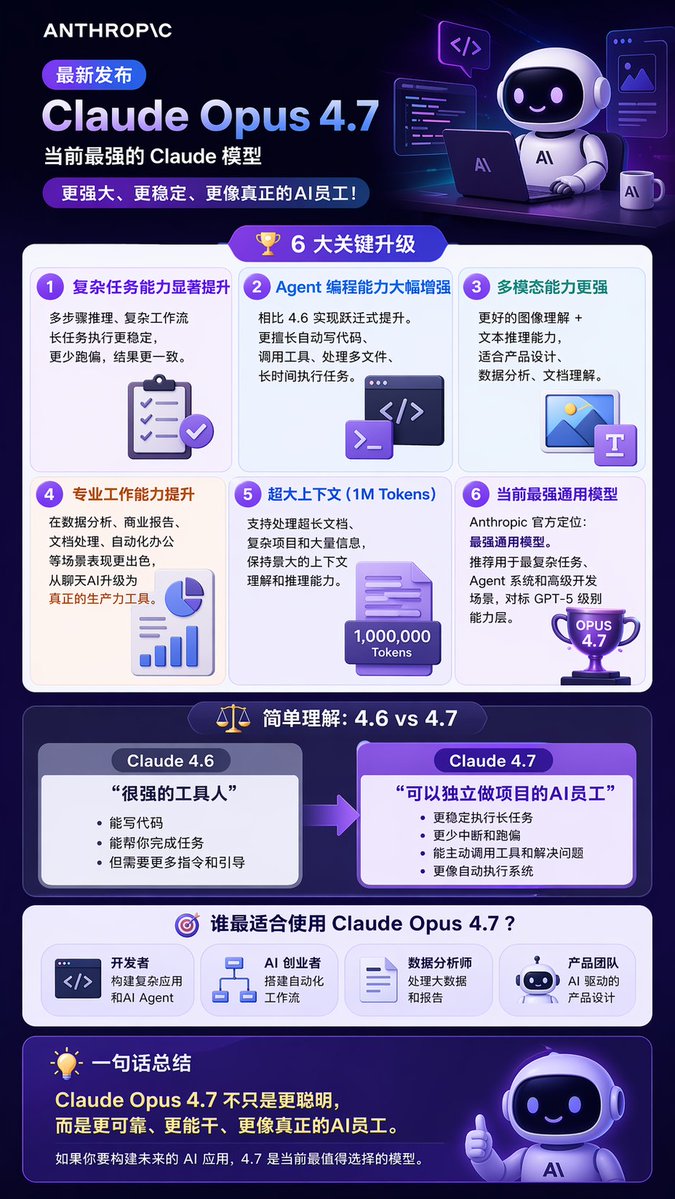
  "type": "long vertical infographic poster",
  "style": "modern tech, 3D isometric illustrations, dark purple and blue color palette, glassmorphism UI elements",
  "header": {
    "logo": "{argument name=\"company logo\" default=\"ANTHROPIC\"}",
    "badge": "最新发布",
    "title": "{argument name=\"product name\" default=\"Claude Opus 4.7\"}",
    "subtitle": "{argument name=\"main subtitle\" default=\"当前最强的 Claude 模型\"}",
    "tagline": "更强大、更稳定、更像真正的AI员工!",
    "illustration": "3D cute robot sitting at a desk with a laptop, coffee mug, and floating code windows"
  },
  "layout": {
    "sections": [
      {
        "title": "6 大关键升级",
        "icon": "3D gold trophy",
        "layout": "2x3 grid",
        "count": 6,
        "items": [
          {"title": "复杂任务能力显著提升", "icon": "3D clipboard with checkmarks"},
          {"title": "Agent 编程能力大幅增强", "icon": "3D code terminal window"},
          {"title": "多模态能力更强", "icon": "3D image and text document"},
          {"title": "专业工作能力提升", "icon": "3D pie chart and bar graph"},
          {"title": "超大上下文 (1M Tokens)", "icon": "3D document with 1,000,000 Tokens text"},
          {"title": "当前最强通用模型", "icon": "3D purple trophy with OPUS 4.7 text"}
        ]
      },
      {
        "title": "简单理解:4.6 vs 4.7",
        "icon": "3D balance scale",
        "layout": "side-by-side comparison with right-pointing arrow",
        "count": 2,
        "columns": [
          {
            "header": "{argument name=\"comparison version 1\" default=\"Claude 4.6\"}",
            "quote": "很强的工具人",
            "style": "grey box"
          },
          {
            "header": "{argument name=\"comparison version 2\" default=\"Claude 4.7\"}",
            "quote": "可以独立做项目的AI员工",
            "style": "purple box, highlighted"
          }
        ]
      },
      {
        "title": "谁最适合使用 Claude Opus 4.7?",
        "icon": "3D target",
        "layout": "horizontal row",
        "count": 4,
        "labels": [
          "开发者",
          "AI 创业者",
          "数据分析师",
          "产品团队"
        ]
      }
    ],
    "footer": {
      "title": "一句话总结",
      "icon": "3D lightbulb",
      "main_text": "Claude Opus 4.7 不只是更聪明,而是更可靠、更能干、更像真正的AI员工。",
      "sub_text": "如果你要构建未来的 AI 应用,4.7 是当前最值得选择的模型。",
      "illustration": "3D cute robot giving a thumbs up"
    }
  }
}





0 Comments
👥 Co-learning Circle 0
Observe other members' variables & configurations, and click "Study & Retry" to instantly import settings and practice!