

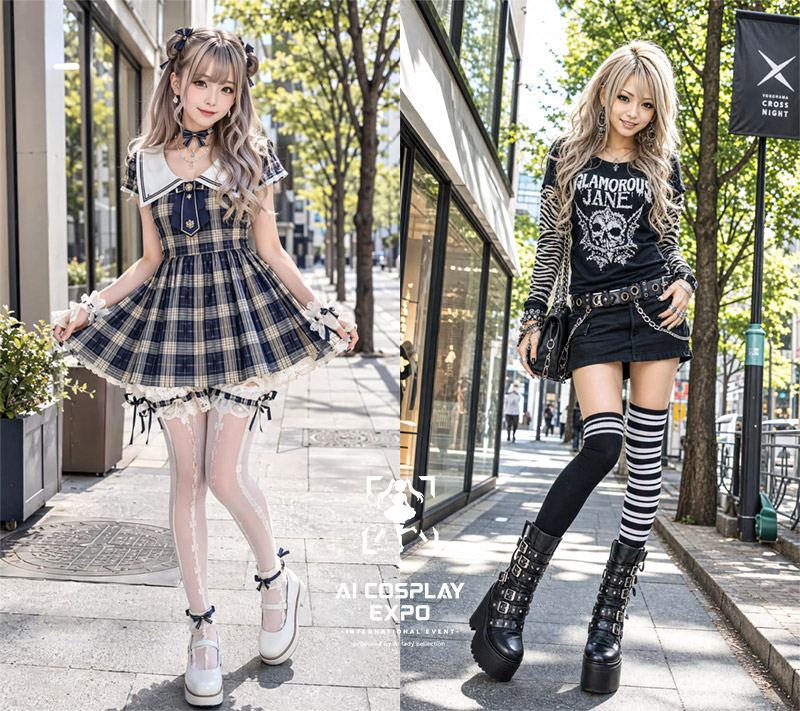
Goal: Create a high-resolution 2.5D photorealistic fashion generator image showing two full-body AI cosplay fashion models side by side on a sunny urban shopping street, like a street-style lookbook comparison.

Canvas: Landscape 4:3 image, approximately 800×640 px, split vertically into exactly 2 equal panels with no border line. Bright daylight, sharp details, shallow-to-medium depth of field, realistic street photography with a polished AI illustration finish.

Layout: The left panel shows one model standing centered on a sidewalk in front of glass storefronts and trees, holding out the sides of her skirt in a cute pose. The right panel shows one model standing centered on a city sidewalk with glass buildings, trees, street signs, and a black hanging banner in the background, posing confidently with one hand near her hip. Add a small white event-style watermark/logo near the lower center overlapping the split, reading “AI COSPLAY EXPO” with smaller tiny unreadable event text below and a simple white mascot/icon above.

Subject count: Exactly 2 full-body female fashion models. Both have intentionally blurred, featureless faces with smooth beige rectangular/oval blur masks, while hair, clothing, body pose, and accessories remain detailed.

Left model: A cute gothic lolita idol outfit on [left character style]. Outfit count for the left panel: 1 navy-and-cream plaid short dress with a white sailor collar, 1 navy bow at the neckline, 1 fitted corset-like bodice with gold buttons, 1 pleated flared skirt, 1 white lace underskirt, 2 white wrist cuffs with bows, 2 sheer white patterned thigh-high stockings, 2 dark bow garters, and 2 white platform Mary Jane shoes with ankle bows. Add delicate jewelry such as a small necklace and earrings. The pose is shy and cute, knees slightly inward, both hands lifting the skirt edges.

Right model: A punk gyaru streetwear outfit on [right character style]. Outfit count for the right panel: 1 black graphic long-sleeve top reading “GLAMOROUS JANE” with a skull illustration, 2 zebra-striped sleeves, 1 black mini skirt, 1 studded belt with metal rings, 2 hanging silver chains, 1 black shoulder bag, multiple bracelets and rings, 2 mismatched thigh-high socks where one is solid black and one is black-and-white striped, and 2 black platform buckle boots. The pose is edgy and confident, one leg forward, one hand at the waist, the other relaxed.

Environment: Modern Japanese city fashion district sidewalk, bright green trees, sunlit pavement, reflections in glass storefronts, distant pedestrians kept small and unobtrusive. The right panel includes a black vertical street banner with a white abstract X logo and small text resembling “CROSS NIGHT.”

Visual style: 2.5D hybrid of photorealistic street photography and polished AI cosplay illustration, crisp clothing textures, realistic lighting and shadows, high-fashion street snap composition, vibrant but natural colors. Use [lighting].

Text content: Include exactly 2 visible text areas: the small lower-center watermark “AI COSPLAY EXPO” and the right-side background banner with a white X-like logo and tiny “CROSS NIGHT”-style wording. Do not add any other readable captions.

Constraints: Keep both faces blurred and anonymous, show both characters full body from head to shoes, maintain the exact two-panel split, no extra people in the foreground, no cropped feet, no anime face details, no raw prompt text, no frame border.



0 Comments
👥 Co-learning Circle 0
Observe other members' variables & configurations, and click "Study & Retry" to instantly import settings and practice!