

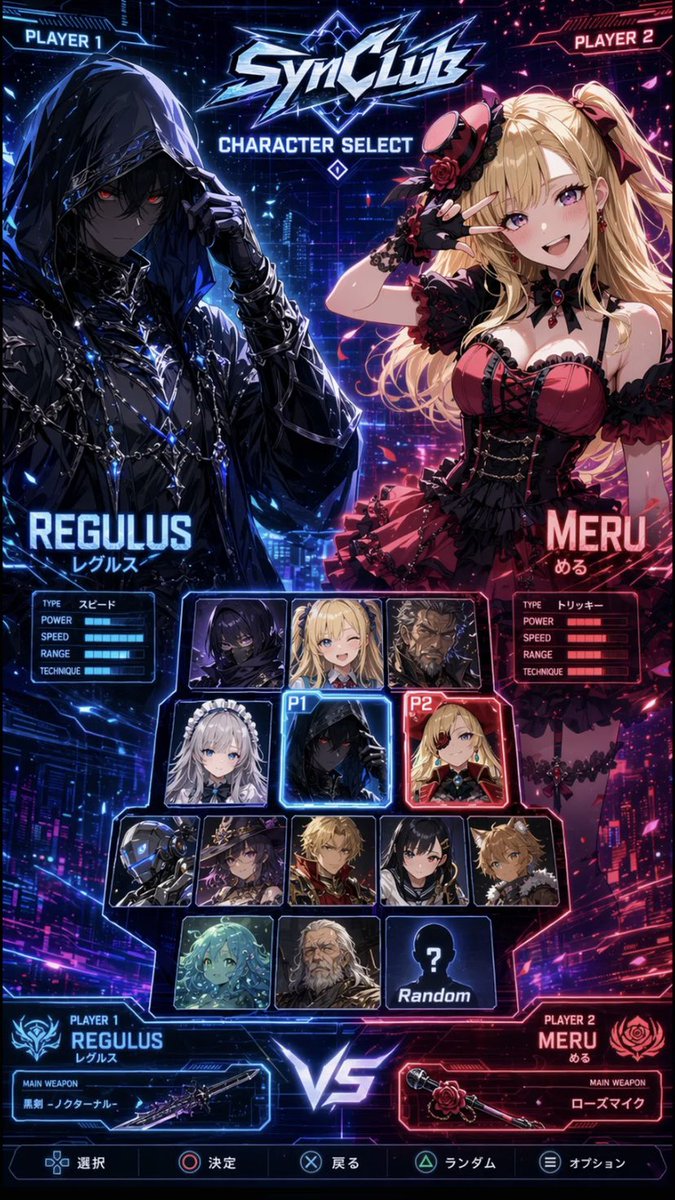
Goal: Create a vertical cyberpunk anime fighting game character select screen for a fictional game titled [game logo text], styled like a glossy arcade versus menu.

Canvas: Tall 2:3 mobile-poster composition, 675×1200 style, dark futuristic neon city background split diagonally into blue left side and hot pink/red right side, with glowing HUD lines, scanlines, sparks, particles, and high-contrast rim lighting.

Layout: At the very top, place angular metallic logo text “SynClub” with electric blue highlights, and beneath it the title “CHARACTER SELECT”. Put “PLAYER 1” in a blue sci-fi tab at the top-left and “PLAYER 2” in a pink sci-fi tab at the top-right. The screen is divided into two large featured character areas: left selected fighter for Player 1 in blue, right selected fighter for Player 2 in red. In the center lower half, place a character portrait selection grid with glowing frames. At the bottom center, place a large luminous “VS”. Along the bottom edge, add a game controller command bar with five options: select, confirm, back, random, option, each with small PlayStation-style button icons.

Main characters: Player 1 is [player one character name], a dark hooded anime fighter with black cloak, chains, metallic accessories, glowing blue highlights, pale shadowed face, red eyes, one gloved hand lifting the hood, mysterious assassin/rogue mood. Add the Japanese reading “レグルス” under the name. Player 2 is [player two character name], a blonde gothic-lolita anime girl with long twin-tail hair, red and black frilled dress, rose accessories, black gloves, choker, heart gem, playful elegant pose with one hand near her face. Add the Japanese reading “める” under the name.

Stats panels: Under each large character name, include a compact rectangular stat box with exactly 5 labeled rows: TYPE, POWER, SPEED, RANGE, TECHNIQUE. For Regulus, the TYPE value is “スピード” and the bars glow blue. For Meru, the TYPE value is “トリッキー” and the bars glow red.

Character select grid: Include exactly 14 selectable tiles in the central grid, each with a glowing sci-fi border. Count and arrange them as follows: Row 1 has 3 tiles: hooded dark male portrait, blonde female portrait, dark masked/obscured portrait. Row 2 has 3 tiles: silver-haired maid girl, selected Regulus tile marked with a blue “P1” tag, selected Meru tile marked with a red “P2” tag. Row 3 has 5 tiles: robot/cyborg head, witch girl with hat, blond male portrait, black-haired masked fighter, tan spiky-haired boy. Row 4 has 3 tiles: turquoise aquatic/mermaid-like girl, pale white-haired character, and a black silhouette tile with a question mark labeled “Random”. Use blue selection glow around P1 and red selection glow around P2.

Bottom versus panels: Bottom-left blue player panel reads “PLAYER 1 REGULUS レグルス” with an emblem and a weapon box labeled “MAIN WEAPON” showing [player one weapon] beside a sleek dark sword illustration. Bottom-right red player panel reads “PLAYER 2 MERU める” with a rose emblem and a weapon box labeled “MAIN WEAPON” showing [player two weapon] beside a rose-themed microphone weapon illustration.

Visual style: Ultra-detailed anime key art, glossy UI, esports fighting game interface, neon blue versus neon magenta palette, sharp angular frames, glowing typography, dramatic lighting, dense futuristic city details, polished game-menu screenshot look.

Constraints: Keep all text legible and aligned like a real character select UI. Use exactly 2 large featured characters and exactly 14 central selectable tiles. Do not add extra characters outside the grid. No watermark.



0 Comments
👥 Co-learning Circle 0
Observe other members' variables & configurations, and click "Study & Retry" to instantly import settings and practice!