

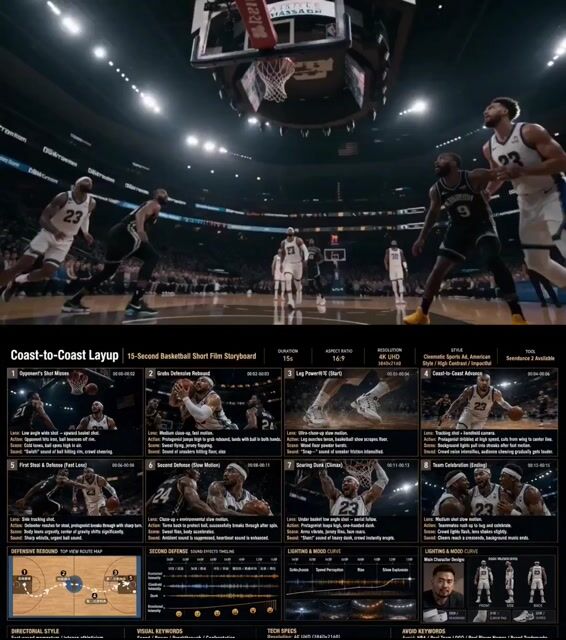
Create a cinematic basketball storyboard image in a fictional American-style indoor basketball arena.

Story:
The opposing team misses a shot. Our player grabs the defensive rebound in the backcourt and drives coast-to-coast for a powerful dunk. During the fast break, he encounters two steal attempts:
First defender: quick crossover move to break through (fast-paced camera cut)

Second defender: spin move breakout (slow-motion close-up)
Final scene: slow-motion dunk with intense facial expression and emotional impact.
After the dunk, teammates run in to celebrate with chest bumps and hand slaps.

Add an extra close-up scene of the player’s legs pushing off explosively during the acceleration phase.

Style:
Semi-realistic 3D sports cartoon style, cinematic sports concept art, stylized athletic character design, NOT photorealistic.

Aspect Ratio:
16:9 widescreen
Resolution:
4K UHD

Storyboard Layout:
3-column cinematic storyboard grid with 8 scenes.
1️⃣ Basic Setup

Main title + subtitle
Aspect ratio and layout labels

Character design reference section
Front portrait of the main player

Full-body front / side / back views

Include shoes, headband, elbow pad
2️⃣ Style Direction
Director-style cinematic mood
Visual keywords
Examples:
dynamic sports commercial
cinematic action sequence

handheld camera energy

dramatic arena lighting
high-speed motion blur
emotional victory climax
3️⃣ Storyboard Details
Each scene should clearly contain:
Camera angle
Character action
Visual changes
Sound effects
Motion effects

Lighting mood
4️⃣ Visual Rules

Dark cinematic color palette
Orange and teal contrast
Strong rim lighting
Arena spotlight atmosphere
Motion blur during fast scenes
Slow-motion particles and sweat details during hero moments

5️⃣ Bottom Information Area
Include:

Character settings
Mood curve
Sound effects timeline
Lighting timeline
Technical specifications
Top-down movement route diagram showing:
rebound → acceleration → crossover → spin move → dunk finish



0 Comments
👥 Co-learning Circle 0
Observe other members' variables & configurations, and click "Study & Retry" to instantly import settings and practice!