

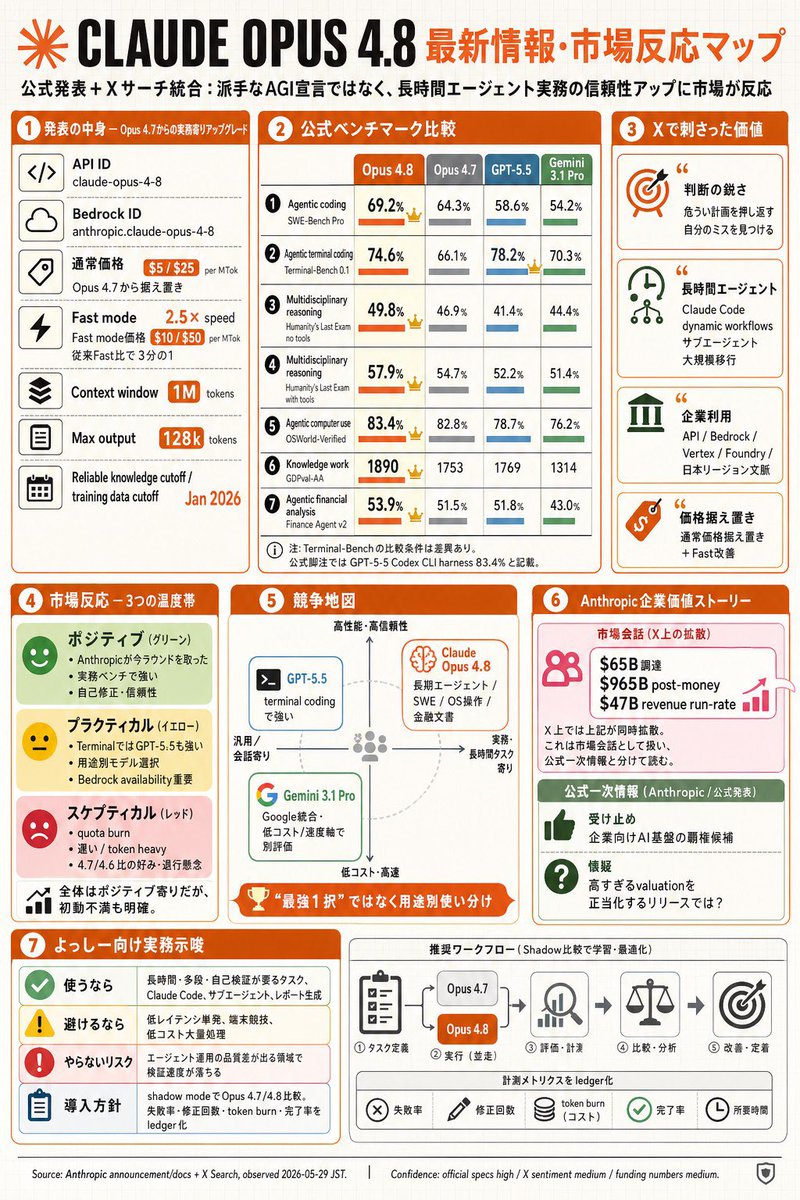
Goal: Create a dense Japanese tech infographic about [main topic] and market reaction, styled as a GPT-image-2 generated editorial slide.

Canvas: Portrait 2:3 infographic, off-white graph-paper background with faint grid lines, orange and black headline branding, rounded rectangular cards, thin gray dividers, orange section headers, small flat icons, and compact Japanese typography. Use a clean business-tech layout with a slightly hand-assembled newsletter feel.

Top header: Large black title “CLAUDE OPUS 4.8” with an orange radial starburst logo at far left. To the right, an orange Japanese headline: [headline text]. Under it, a smaller Japanese subtitle: “公式発表+Xサーチ統合:派手なAGI宣言ではなく、長時間エージェント実務の信頼性アップに市場が反応”.

Overall layout: Use exactly 7 numbered main sections, each with an orange circular number badge and orange title bar. Arrange sections 1–3 across the upper half, sections 4–6 in the middle, and section 7 plus a workflow strip across the bottom. Keep all content packed but readable.

Section 1, left column, “発表の中身 — Opus 4.7からの実務寄りアップグレード”: Show exactly 6 stacked spec rows with square black line icons on the left and labels/values on the right: 1) API ID, value “claude-opus-4-8”; 2) Bedrock ID, value “anthropic.claude-opus-4-8”; 3) 通常価格, orange price pills “$5 / $25 per MTok” and note “Opus 4.7から据え置き”; 4) Fast mode, orange “2.5× speed” and price pills “$10 / $50 per MTok”, note “従来Fast比で3分の1”; 5) Context window, orange pill “1M tokens”; 6) Max output, orange pill “128k tokens”; add a bottom small row “Reliable knowledge cutoff / training data cutoff” with orange date [training cutoff date].

Section 2, top center, “公式ベンチマーク比較”: Create a comparison table with exactly 4 model columns labeled “Opus 4.8”, “Opus 4.7”, “GPT-5.5”, and “Gemini 3.1 Pro”. Use orange for Opus 4.8, gray for Opus 4.7, blue for GPT-5.5, green for Gemini. Include exactly 7 benchmark rows with small numbered circles, metric names, percentages/scores, horizontal mini bars, and small crown icons where Opus 4.8 leads: 1) Agentic coding / SWE-Bench Pro: 69.2%, 64.3%, 58.6%, 54.2%; 2) Agentic terminal coding / Terminal-Bench 0.1: 74.6%, 66.1%, 78.2%, 70.3%; 3) Multidisciplinary reasoning / Humanity’s Last Exam no tools: 49.8%, 46.9%, 41.4%, 44.4%; 4) Multidisciplinary reasoning / Humanity’s Last Exam with tools: 57.9%, 54.7%, 52.2%, 51.4%; 5) Agentic computer use / OSWorld-Verified: 83.4%, 82.8%, 78.7%, 76.2%; 6) Knowledge work / GDPval-AA: 1890, 1753, 1769, 1314; 7) Agentic financial analysis / Finance Agent v2: 53.9%, 51.5%, 51.8%, 43.0%. Add a small Japanese footnote beneath the table.

Section 3, top right, “Xで刺さった価値”: Show exactly 4 stacked insight cards with large icons and quotation marks: 1) orange target icon, title “判断の鋭さ”, note about catching dangerous blind spots and noticing your own mistakes; 2) green clock/network icon, title “長時間エージェント”, note “Claude Code dynamic workflows / サブエージェント / 大規模移行”; 3) green enterprise-building icon, title “企業利用”, note listing “API / Bedrock / Vertex / Foundry / 日本リージョン文脈”; 4) orange price-tag icon, title “価格据え置き”, note “通常価格据え置き + Fast改善”.

Section 4, middle left, “市場反応 — 3つの温度帯”: Create exactly 3 sentiment bands plus one summary band: 1) green “ポジティブ(グリーン)” with smiling face icon and three bullets about winning back trust in Anthropic, strong real benchmarks, and self-correction/reliability; 2) yellow “プラクティカル(イエロー)” with neutral face icon and three bullets about Terminal being strong for GPT-5.5, usage model selection, and Bedrock availability; 3) red “スケプティカル(レッド)” with sad face icon and three bullets about quota burn, heavy token burn, and suspicion of 4.7/4.6 comparison; 4) white summary row with tiny bar-chart icon: “全体はポジティブ寄りだが、初動不満も明確。”

Section 5, middle center, “競争地図”: Draw a quadrant map with vertical axis “高性能・高信頼性” at top to “低コスト・高速” at bottom, horizontal axis “汎用/会話寄り” left to “実務・長時間タスク寄り” right. Include exactly 3 model cards: a blue “GPT-5.5” card on the upper-left/center labeled “terminal codingで強い”; an orange “Claude Opus 4.8” card in the upper-right with a brain icon and text “長期エージェント / SWE / OS操作 / 金融文書”; a green “Gemini 3.1 Pro” card in the lower-left with Google-style G icon and text “Google統合・低コスト / 速度軸で別評価”. Add a dashed circular guide and a bottom orange trophy ribbon reading “最強1択ではなく用途別使い分け”.

Section 6, middle right, “Anthropic 企業価値ストーリー”: Split into exactly 2 cards. Top pink card titled “市場会話(X上の拡散)” with people icon, growth arrow, and three bold funding lines: “$65B 調達”, “$965B post-money”, “$47B revenue run-rate”; add small caveat text that X treats these as market conversation and they are not official announcement figures. Bottom green card titled “公式一次情報(Anthropic / 公式発表)” with exactly 2 rows: thumbs-up icon “受け止め 企業向けAI基盤の覇権候補”; question icon “懐疑 高すぎるvaluationを正当化するリリースでは?”.

Section 7, bottom left, “よっしー向け実務示唆”: Make exactly 4 rows with colored icons: 1) green check “使うなら” followed by tasks such as long-duration, many-step, self-verification, Claude Code, migration, and refactoring; 2) yellow warning “避けるなら” followed by low-latency single-shot, simple searches, and high-cost large-volume processing; 3) red exclamation “やらないリスク” followed by missing early signals in engineering and product domains; 4) blue clipboard “導入方針” followed by comparing shadow mode with Opus 4.7/4.8 and logging failures, correction count, token burn, and completion rate.

Bottom workflow strip, to the right of section 7: Title it “推奨ワークフロー(Shadow比較で学習・最適化)”. Show exactly 5 process steps connected by arrows: 1) task-definition clipboard icon “タスク定義”; 2) comparison block with two pills “Opus 4.7” and orange “Opus 4.8”, label “実行(並走)”; 3) magnifier/chart icon “評価・計測”; 4) scales icon “比較・分析”; 5) target icon “改善・定着”. Beneath, add a metrics ledger row with exactly 5 chips/icons: “失敗率”, “修正回数”, “token burn(コスト)”, “完了率”, “所要時間”.

Footer: Add tiny source and confidence text along the bottom: “Source: Anthropic announcement/docs + X Search, observed 2026-05-29 JST.” and “Confidence: official specs high / X sentiment medium / funding numbers medium.” Include a small shield icon at bottom right.

Visual constraints: Use mostly orange, black, gray, green, blue, yellow, and red accents; include many small icons but no photorealism; keep the page crisp, flat, legible, and information-dense; no watermark; no extra sections beyond the 7 numbered sections and the workflow strip.



0 Comments
👥 Co-learning Circle 0
Observe other members' variables & configurations, and click "Study & Retry" to instantly import settings and practice!