

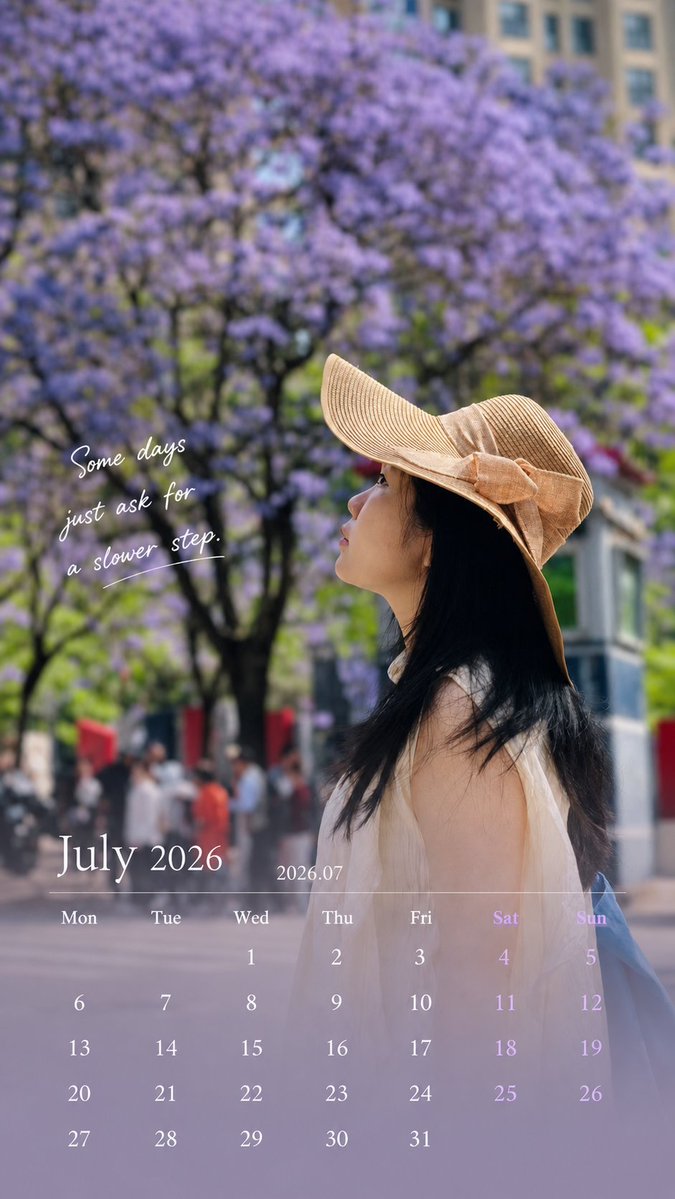
Use the uploaded photo to generate a 9:16 vertical calendar card.

[1. Execution Mode — Critical]

This is an image editing task, NOT image generation.

Use the original photo as the base layer
Do NOT recreate, redraw, or reinterpret the image

Strictly preserve:

face, identity, expression, hair, body, clothing
original lighting, shadows, color temperature
environment and composition

❗ No beautification, no smoothing, no retouching
❗ The photo must look unchanged

[2. Allowed Operations — Overlay Only]

Only add design elements on top:

bottom 30% soft gradient extension (for calendar area)
subtle translucent mask for readability
calendar layout, month title, and short caption

Forbidden:

repainting or altering existing pixels
changing global color style
applying “design filters”
[3. Color Strategy]

Colors must come from the current image:

extract primary / secondary / accent colors
apply slight desaturation and brightness normalization only
keep original photo color feeling

👉 Respect the image, do not redesign the color system

[4. Layout Structure]
Top 70%: original image (untouched)
Bottom 30%: gradient + calendar
smooth transition, no hard edges
clean spacing, minimal design
magazine-like, not template-style
[5. Calendar Content — Must Be Accurate]

Generate correct calendar for the given month:

Title: [month title]
Weekdays: Mon Tue Wed Thu Fri Sat Sun
Dates: accurate alignment based on real calendar
[6. Caption Rules — Important]

Length: 8–16 words (or equivalent short phrase)

Requirements:

max 2 lines
no exclamation marks
no clichés, no motivational tone
do NOT explain emotions

Preferred style:

subtle, atmospheric
fragment-like, not fully explanatory
leave emotional space

👉 Make people pause, not finish reading

[7. Image Selection Guidance — Key to Success]

Prefer:

side face / partially hidden face
natural遮挡 (hat, hand, shadow)
motion (walking, turning)
mood > facial detail

Avoid:
front-facing portraits
strong identity-focused close-ups

👉 Reduce face-modification risk

[Final Principle]

👉 Do NOT generate a better photo.
Gently place design on the original photo.



0 Comments
👥 Co-learning Circle 0
Observe other members' variables & configurations, and click "Study & Retry" to instantly import settings and practice!