

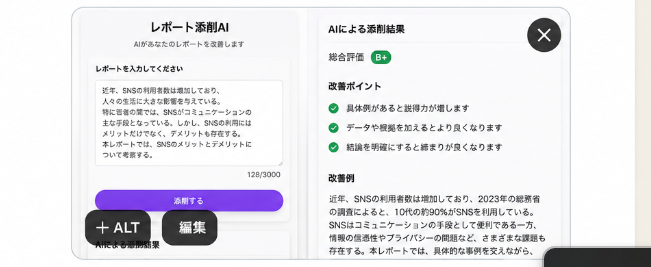
Goal: Create a clean, realistic mobile app mockup for a Japanese AI report-checking app, shown as a rounded white modal card on a light gray background, suitable for testing demand on social media. The app name should be [app title] and the screen should look like a finished product UI.

Canvas: Wide horizontal image, approximately 16:7 aspect ratio. Center a large rounded rectangle app window with a soft shadow, thin light-gray border, and bright white background. Add subtle vertical divider lines and very light gradients to make it feel like a polished SaaS/mobile web interface.

Layout: Use exactly 2 main content panels inside the app window. Left panel is the report input area. Right panel is the AI correction results area. Place a dark circular close button with a white “×” in the top-right corner of the modal. Add two floating dark pill buttons near the bottom-left overlapping the modal: one labeled “+ ALT” and one labeled “編集”. A partial dark rounded bar is barely visible at the bottom-right edge, cropped by the image frame.

Left panel details: At the top center, show the heading “レポート添削AI” and a smaller subtitle “AIがあなたのレポートを改善します”. Below, add the section label “レポートを入力してください”. Show a large textarea card with a sample Japanese report paragraph about SNS usage among young people; include a small character counter “128/3000” at the lower right of the textarea. Under the textarea, place one prominent purple rounded button labeled “添削する”. Beneath the button, add a tiny caption “AIによる添削開始”.

Right panel details: Add the title “AIによる添削結果”. Show a rating row with label “総合評価” and a small green rounded badge labeled “B+”. Then create an “改善ポイント” section containing exactly 3 checklist items, each preceded by a green circular check icon: 1) “具体例があると説得力が増します”, 2) “データや根拠を加えるとより良くなります”, 3) “結論を明確にすると締まりが良くなります”. Below that, add an “改善例” section with a paragraph of Japanese corrected text beginning with “近年、SNSの利用者数は増加しており、2023年の総務省の調査によると、10代の約90%がSNSを利用している。” and continuing in small readable Japanese body text.

Visual style: Minimal Japanese product UI, Apple-like rounded corners, crisp sans-serif Japanese typography, black and dark-gray text, green success accents, purple primary CTA button with slight gradient, generous whitespace, realistic soft shadows, high-resolution screenshot aesthetic.

Constraints: Keep the UI text in Japanese exactly where specified, use no extra panels beyond the 2 main panels, include exactly 3 checklist improvement items, no people, no illustrations, no watermark, no browser chrome, no phone frame.



0 Comments
👥 Co-learning Circle 0
Observe other members' variables & configurations, and click "Study & Retry" to instantly import settings and practice!