

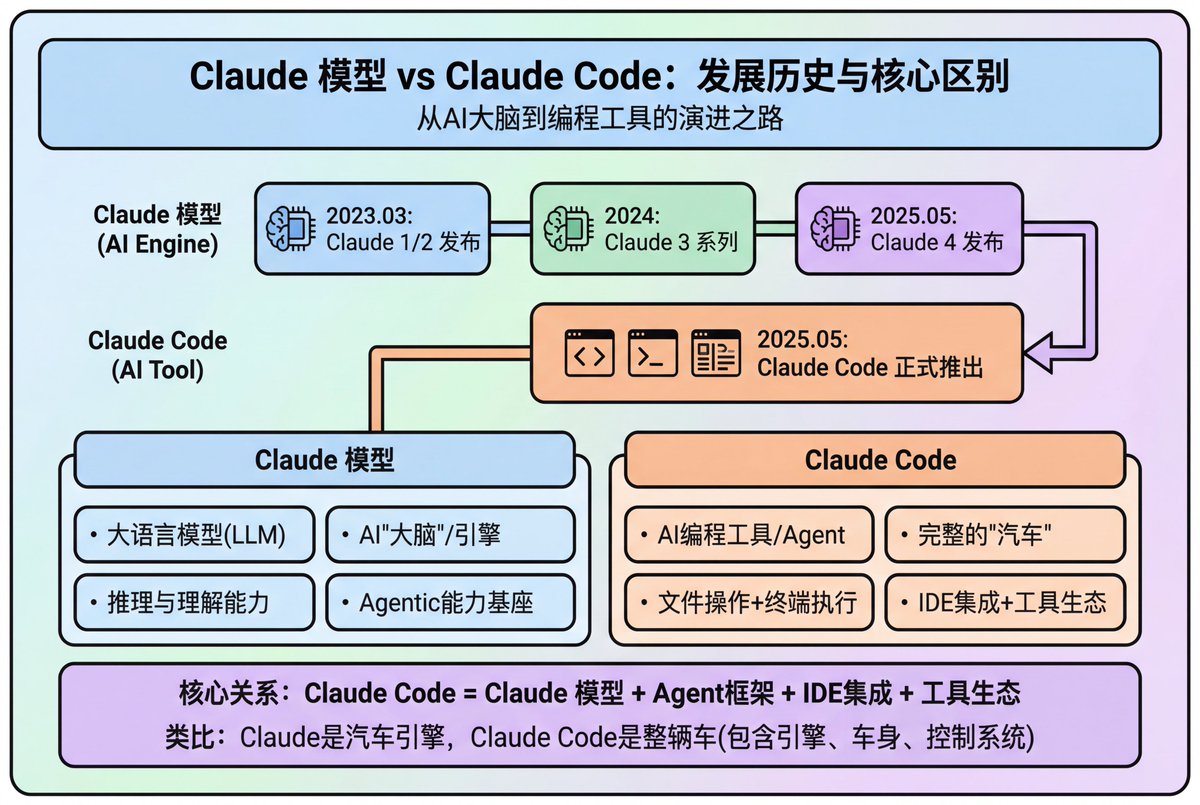
1. Overall Visual Style

Style Keywords: Flat UI, Vector, Modern Minimalist, Card-style design.

Lines and Shapes:

Rounded Corners Priority: All borders, background blocks, buttons, and process nodes must be rounded rectangles (Rounded Rectangles, with a large corner radius, approximately 10-15px).

Elbow Lines: Process connections use right-angle polylines (no curves), lines are simple and strong.

Color Logic (Key):

“Candy Color” Scheme: Use light backgrounds with high brightness and low saturation (such as light blue, light green, light purple), paired with darker borders of the same color family.

Border Emphasis: All graphics must have clear 2px~3px solid borders.

2. Vertical Layout Structure

Regardless of the topic, please follow the following top-down layout order, which must be contained within a large border container:

Layer 1: Main Title (Header)

Position: Centered at the top of the container.

Style: Bold black font, largest font size, darkest color.

Layer 2: Core Flowchart Area

Position: Occupies 50% of the core area of the layout.

Content: Rectangular nodes + arrow connections. If it is a loop step, please use a dashed line pointing back.

Layer 3: Feature List

Position: Below the flowchart, centered or left-aligned.

Style: Short and concise bullet points, slightly smaller font, with some white space.

Layer 4: Full-width Summary Box (Footer Box)

Position: At the very bottom of the container, filling the width horizontally.

Color Scheme: Use a contrasting color (such as purple in the example), distinct from the main color scheme above.

Function: Used to place 'Summary', 'Analogy', or 'Core Conclusion'.

Landscape size (horizontal/scenic mode) is chosen because:

Content Adaptation: Horizontal content like timelines is better displayed in a horizontal canvas to show the evolution process.

Presentation Friendly: The 3:2 horizontal ratio is very suitable for insertion into PPTs and documents, and displays well on projectors or screens.

Information Capacity: Horizontal layout can accommodate more text and icons, avoiding clutter.



0 Comments
👥 Co-learning Circle 0
Observe other members' variables & configurations, and click "Study & Retry" to instantly import settings and practice!