

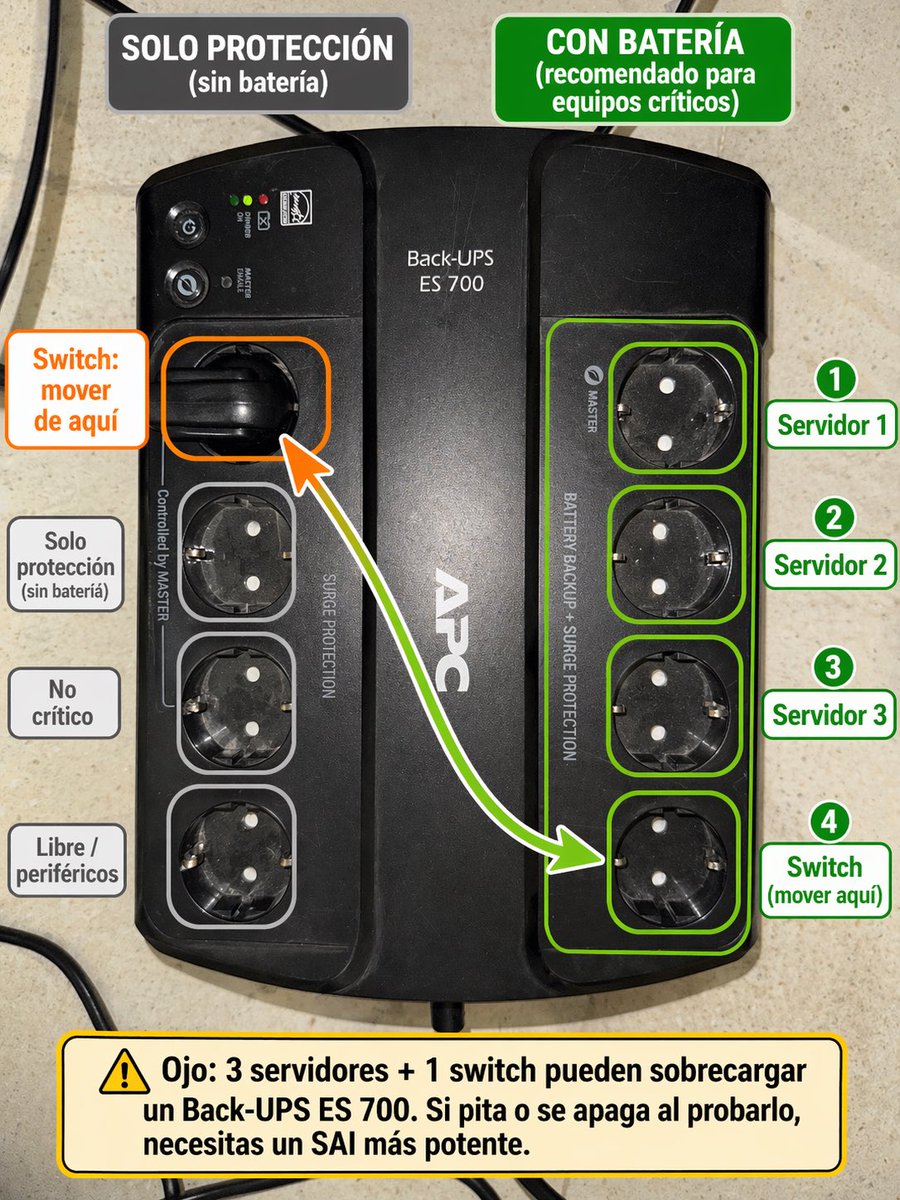
Using the provided reference image of the APC Back-UPS, turn it into a clear Spanish annotated setup guide overlaid directly on the photo. Keep the UPS photo realistic and unchanged as the base, but add color-coded callouts showing which outlets are battery-backed versus surge-only. At the top, add 2 header boxes: on the left a dark gray box reading "SOLO PROTECCIÓN (sin batería)", and on the right a green box reading "CON BATERÍA (recomendado para equipos críticos)". Highlight the 4 right-side outlets with a green outline group and individual green outlines, and place 4 numbered green labels on the right: "1 Servidor 1", "2 Servidor 2", "3 Servidor 3", "4 Switch (mover aquí)". On the left, highlight the currently used upper-left outlet with an orange outline and add an orange callout box reading "Switch: mover de aquí", plus a curved arrow from that outlet to the bottom outlet of the right-side green group. Also outline the 3 lower-left outlets in light gray and add 3 gray labels on the left aligned to them: "Solo protección (sin batería)", "No crítico", and "Libre / periféricos". At the bottom, add a large yellow warning box with a caution icon and this text: "Ojo: 3 servidores + 1 switch pueden sobrecargar un Back-UPS ES 700. Si pita o se apaga al probarlo, necesitas un SAI más potente." Clean infographic style, readable bold typography, neat rounded rectangles, high contrast, and practical IT-diagram presentation.



0 Comments
👥 Co-learning Circle 0
Observe other members' variables & configurations, and click "Study & Retry" to instantly import settings and practice!